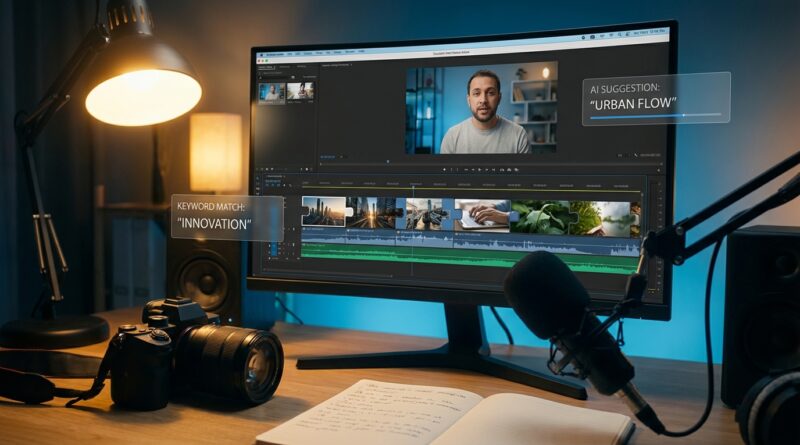
The ‘Auto B‑Roll Engine’ Hack: Let AI Fill Every Awkward Gap In Your Reels Timeline
You know the moment. Your talking-head cut is done, the pacing is solid, and then you hit the wall. Now you need B-roll. Suddenly the quick edit turns into an hour of stock-site scrolling, random downloads, and dragging files around just to hide jump cuts and give the video some life. It is one of the most annoying parts of making Reels, Shorts, and TikToks, especially if you are working solo.
The good news is that a better ai b roll generator workflow for social media videos is finally here. Tools like Vizard, Kapwing’s B-roll generator, and Vimerse Studio can now read your script, suggest or generate matching visuals, and place them right where your timeline needs help. The trick is not to let the tool run wild. It works best when you set up a simple three-step engine: mark the moments that need coverage, let AI suggest or create clips, then do a quick human pass to fix the odd choices. That cuts editing time, keeps your videos moving, and saves your brain for the creative part.
⚡ In a Hurry? Key Takeaways
- Yes, you can use an AI B-roll engine to fill jump cuts and dead space in social videos far faster than doing it by hand.
- Best results come from a three-step workflow: script tagging, AI clip generation or matching, then a fast review pass.
- Do not publish untouched AI choices. Always check for weird visuals, copyright limits, and clips that do not match your point.
Why B-roll is still the time sink nobody talks about
Most creators do not struggle with the first cut anymore. Modern editors make it pretty easy to trim silences, remove filler words, and punch in on key moments.
B-roll is the part that still eats the clock.
You have to find a clip that matches the line. Then make sure it fits vertical video. Then make sure it is not too generic, too cheesy, too long, too short, or just plain wrong. Multiply that by ten awkward gaps in one Reel and your “quick post” is gone for the afternoon.
This is why the new wave of AI editors matters. Not because they magically make art. Because they remove the boring scavenger hunt.
The three-step auto B-roll engine
If you want an ai b roll generator workflow for social media videos that actually saves time, keep it simple. Think of it like a small assembly line.
Step 1: Mark the lines that need visual cover
Before you touch any AI tool, scan your script or transcript and label only the parts that need support.
Usually that means:
- Jump cuts that feel jarring
- Abstract ideas that need a visual example
- Moments where your face has been on screen too long
- Hook lines that need extra punch
Keep the notes plain. For example:
- “show phone notifications piling up”
- “busy desk, creator editing late”
- “close-up typing on laptop”
- “calendar filling with content posts”
This matters because AI tools perform much better when you give them clear visual intent instead of hoping they read your mind.
Step 2: Let the editor suggest or generate B-roll from the script
Now feed that transcript into a tool that can match visuals to speech.
Here is how the current options generally break down:
Vizard
Good for turning long videos into social clips quickly. It can help identify key moments and add supporting media, especially if your source is already a spoken video.
Kapwing’s B-roll generator
Useful if you want script-aware suggestions inside a browser-based editor. It is friendly for people who do not want a big pro editing app.
Vimerse Studio
Aimed at fast social production, with AI help for pacing, clipping, and visual matching. Good if your goal is speed and consistency.
Your goal at this stage is not perfection. It is coverage. You want the AI to fill 70 to 80 percent of the obvious gaps so you are not starting from zero.
Step 3: Do the five-minute human cleanup
This is the step people skip, and it is why some AI-edited videos still feel sloppy.
Watch the cut once from top to bottom and ask:
- Does the B-roll actually match the sentence?
- Is anything too literal or distracting?
- Did the AI pick a clip with the wrong mood?
- Are there repeated visuals that make the edit feel cheap?
- Does every insert help the story move?
If a clip makes you pause and think, “Well, that is sort of close,” replace it. Social video moves too fast for maybe.
How to build this into your weekly content routine
The smartest way to use these tools is not one video at a time. It is as a repeatable system.
Batch your scripts first
If you record three or five videos in one sitting, run all the transcripts through the same editor session. That way the AI can suggest visuals in bulk, and you stay in one mental mode instead of constantly switching tasks.
Create a small “approved B-roll” library
Not every clip needs to be generated from scratch. Save the visuals that fit your brand well. Phone close-ups. Desk shots. Walking footage. Coffee shop scenes. Over-the-shoulder typing shots.
Then let AI mix those with fresh suggestions. That gives you more consistency and fewer weird surprises.
Use AI for filler, not for your signature shots
If a video has one key visual moment that really sells the point, choose that yourself. Let AI cover the utility moments. Use your own taste for the hero shots.
What these tools are actually good at, and where they still stumble
Let us be honest. AI B-roll tools are not tiny film editors living in your browser.
They are pattern-matching machines. Very useful ones. But still machines.
Where they shine
- Covering jump cuts fast
- Matching simple script ideas to generic visuals
- Speeding up high-volume short-form editing
- Helping non-editors make videos that feel more polished
Where they still get awkward
- Complex metaphors
- Niche industry topics
- Brand-specific visual style
- Emotional nuance
- Anything that needs taste more than speed
That is why the “engine” idea works so well. You are not handing over the whole edit. You are automating the repetitive middle.
A sample workflow you can copy today
Here is a realistic setup for a solo creator making Instagram Reels or TikToks:
- Record a 60-second talking-head video.
- Upload it to Vizard, Kapwing, or Vimerse Studio.
- Use the transcript to identify 5 to 8 lines that need visual support.
- Prompt the tool to suggest or generate matching B-roll.
- Drop those clips onto the timeline automatically or semi-automatically.
- Replace the 1 or 2 bad picks by hand.
- Export directly in vertical format.
That is the real win. No hunting through six stock libraries. No desktop folder mess. No endless export-import dance.
Tips to keep the results from looking generic
Write for visuals as you script
If your script includes concrete nouns and actions, the AI has a much easier job. “Feeling overwhelmed by admin” is vague. “Drowning in unread emails and missed DMs” gives the tool something visual to grab.
Keep a brand style note nearby
Decide what fits your content. Clean office shots. Warm lifestyle footage. Fast tech close-ups. Then reject anything outside that lane.
Use captions and B-roll together
Sometimes B-roll does not need to explain everything on its own. A strong on-screen caption can make a simple clip feel more relevant and intentional.
Watch out for licensing and accuracy
This part is boring, but important.
Always check what kind of media your tool is pulling in. Some platforms use stock libraries with commercial-use rules. Others generate visuals. Others mix sources. Know what you are allowed to publish, especially if the video is tied to a business or client.
Also, do not let AI create accidental misinformation. If you are talking about a product, a medical topic, finance, or news, random “close enough” visuals can send the wrong message fast.
Who should use this right now
This setup makes the most sense for:
- Solo creators posting multiple times a week
- Small business owners making educational social content
- Podcasters clipping episodes into Shorts
- Agencies that need volume without adding more editors
If you are a filmmaker crafting every frame by hand, this may feel limiting. If you are trying to post four solid videos this week without losing your weekend, it makes a lot more sense.
At a Glance: Comparison
| Feature/Aspect | Details | Verdict |
|---|---|---|
| Speed | AI can suggest or place B-roll from your script far faster than manual stock searching. | Big time saver for short-form creators |
| Quality control | The first pass is often good, but some clips will be off-tone, repetitive, or too generic. | Human review is still needed |
| Best use case | Reels, Shorts, and TikToks where speed, consistency, and basic cinematic polish matter more than frame-perfect artistry. | Excellent for high-volume social workflows |
Conclusion
Creators are surrounded by AI tools right now, but many are still losing the same old hours on B-roll. That is the funny part. The breakthrough is not just “AI editing.” It is using tools like Vizard, Kapwing’s B-roll generator, and Vimerse Studio in a simple three-step engine that actually removes the most annoying job on the timeline. Mark the gaps. Let the tool fill them. Do a quick sanity check. That is it. Done well, this cuts edit time for Reels, Shorts, and TikToks, makes even solo creators look more cinematic, and helps you publish more often without burning yourself out.