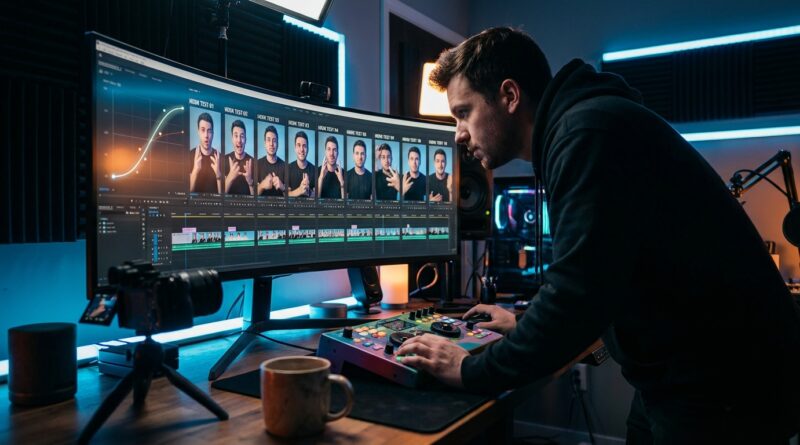
The ‘Auto-Hook Timeline’ Hack: Use One AI Tool To Stress-Test 10 Intros Before You Edit A Single Reel
You know the worst part of making a Reel. It is not filming it. It is spending an hour trimming clips, adding captions, exporting the thing, posting it, and then watching people swipe away before your second sentence lands. That stings. It also wastes a shocking amount of time. If your first three seconds are weak, the rest of your edit barely gets a chance.
That is why more creators are trying a simple trick I keep hearing about from solo editors and tiny teams. Instead of editing one full Reel and hoping the intro works, they use an AI clipper to build an “auto-hook timeline” first. One raw video goes in. Ten possible openings come out. You test the intros before you polish the whole post. It is a much smarter way to use ai video editing hook testing tools for reels and tiktok, because the AI is not replacing your taste. It is just helping you find your best start before you burn time on the rest.
⚡ In a Hurry? Key Takeaways
- Use one AI clipper to generate several opening hooks from the same raw video before you do a full edit.
- Pick the strongest intro first, then finish captions, cuts and formatting only on the version most likely to keep viewers watching.
- This saves time, reduces re-exports, and still keeps you in control because AI suggests options, but you choose the final hook.
What the “auto-hook timeline” hack actually is
Think of it like this. You are not asking an AI tool to make your whole Reel and call it a day. You are asking it to do one very specific job. Find possible opening moments from your raw footage.
Most AI clipping tools already scan long videos for highlights, strong quotes, reaction moments, topic changes, or spikes in energy. The usual way people use them is pretty passive. Upload video. Accept a few clips. Post them.
The hook-first workflow is more hands-on, and better for short-form creators. You upload one talking-head video, podcast segment, tutorial, stream replay, or product demo. Then you ask the tool to give you multiple candidate intros. Maybe 5. Maybe 10. Maybe more.
Now you have a mini timeline of possible starts. One version opens with a bold claim. Another starts with the problem. Another starts with the result. Another starts with a weird or funny line. You watch them back quickly, choose the winner, and only then build the polished Reel.
That is the real trick. You are testing the opening before committing to the full edit.
Why this matters so much for Reels, Shorts and TikTok
Short-form video is brutally front-loaded. People decide fast. Often painfully fast. If the opening feels slow, generic, or confusing, they are gone before your useful point arrives.
Creators usually discover this too late. They finish everything first. They add animated captions. They clean up jump cuts. They export vertical and square versions. Then the post flops because the hook was soft from the start.
That creates a miserable loop. Recut. Re-export. Re-upload. Lose confidence. Second-guess every future idea.
The better approach is to treat the first five seconds like a screen test. Let the AI pull several opening options, then judge those against each other. Which one creates curiosity fastest? Which one makes sense with no context? Which one sounds like something a real person would stop scrolling for?
Once you know that, the rest of the edit gets easier.
How to build an auto-hook timeline in practice
1. Start with one strong raw recording
This works best when your source video has a clear topic and a few natural “aha” moments. It could be a tutorial, a rant, a product test, a before-and-after, or a response to a common question.
You do not need a perfect script. In fact, a slightly looser recording often gives AI tools more natural phrases to pull from.
2. Upload it to an AI clipper or highlight tool
Look for tools that can detect highlights, create clips from transcripts, or suggest social-ready moments from longer videos. Some tools are built for streamers. Some for podcasts. Some for general short-form editing. The exact brand matters less than the feature set.
The useful features are transcript search, multiple clip suggestions, speaker framing, auto-resizing to vertical, and quick timeline previews.
3. Ask for multiple intros, not one finished clip
This is the step many people skip. Do not settle for the first “best moment” the tool suggests. Generate several opening possibilities from the same source.
You are looking for different hook styles, such as:
- A direct pain point
- A surprising statement
- A result-first line
- A controversial opinion
- A quick mistake or myth
- A visual action with a short spoken line
The goal is not ten final videos. The goal is ten starts.
4. Build a rough hook board
Put those intros side by side. Watch them with the sound on. Then sound off. Then on a phone screen, not just your desktop.
Ask a few plain questions:
- Would I understand this in one second?
- Does it create tension, curiosity, or urgency?
- Does it sound human, or weirdly robotic?
- Does the first caption line help or hurt?
- Would I keep watching for the payoff?
You can even text three hook options to a friend and ask which one they would stop for. It is not scientific. It is still useful.
5. Edit only the winner
Once one intro clearly beats the others, then do the real work. Add your polished captions. Tighten pacing. Add B-roll if needed. Put in your branding. Export the versions for Reels, Shorts and TikTok.
This is where your editing time starts paying off, instead of being spent on a clip that was doomed from the first second.
What to look for in ai video editing hook testing tools for reels and tiktok
If you are comparing tools, ignore fancy marketing language for a minute. Focus on the parts that actually help you test hooks fast.
Transcript-based editing
This is a big one. If you can scan the transcript and jump straight to strong lines, you can test intros much faster than scrubbing through footage by hand.
Multiple suggested clips from one source
You want variety. A tool that only gives one “best” clip is less useful than one that offers several candidates with different tones.
Auto-reframing for vertical video
An intro can feel strong in landscape and weak in vertical. Reframing matters, especially if your face, product, or text needs to be readable in the center crop.
Caption previews
Captions are part of the hook now. A good first line on screen can save an average spoken intro. A clumsy caption can ruin a strong one.
Fast duplicate-and-adjust workflow
You should be able to clone a draft, swap the first few seconds, and compare versions quickly. That is the whole point.
Where creators go wrong with this workflow
They let the AI decide what is “best”
The tool can suggest. It cannot fully understand your audience, your voice, or the tiny cultural cues that make a hook click. Treat the suggestions like rough auditions, not final answers.
They test too many tiny variations
If ten hooks all say the same thing in slightly different words, you are not really testing. Make the options meaningfully different.
They polish too early
Do not spend 20 minutes styling captions on a hook that is still on trial. Keep it rough until a winner emerges.
They forget the payoff
A strong intro gets the click or the extra second. It still has to lead somewhere. If the body of the Reel does not deliver on the opening promise, people will drop off anyway.
A simple workflow for solo creators
If you work alone, keep it light:
- Record one 60 to 180 second video around one clear topic.
- Upload it to your AI clipping tool.
- Generate 5 to 10 intro candidates.
- Shortlist 2 or 3.
- Choose the strongest based on clarity and curiosity.
- Finish only that version.
- Reuse the same winner across platforms with minor tweaks.
This pairs especially well with a faster finishing process. If you want to cut down the cleanup stage too, How to Cut Your Reels Edit Time in Half With Smart Presets and Auto-Captions is a good next step, because once you pick the winning hook, presets and caption automation help you get the post out without turning it into another editing marathon.
Is this only for streamers and YouTubers?
Not at all. They just spotted the pattern earlier because they already had lots of long footage to mine. Stream replays, podcasts, interviews and tutorials are perfect raw material for highlight tools.
But social creators can use the same idea even with shorter recordings. A 90-second phone video can still produce several hook options. So can a product demo. So can a voiceover piece. The method matters more than the footage length.
If anything, smaller creators stand to gain the most, because they feel every wasted hour more sharply.
At a Glance: Comparison
| Feature/Aspect | Details | Verdict |
|---|---|---|
| Hook testing speed | AI tools can pull several candidate intros from one recording in minutes instead of forcing you to cut each version by hand. | Excellent for saving time before full editing starts. |
| Creative control | The AI suggests openings, but you still choose the best one and shape the final pacing, captions and style. | Best used as an assistant, not an autopilot. |
| Best fit | Works especially well for creators making talking-head clips, repurposed livestreams, tutorials, podcasts and product explainers. | Most useful when the opening line determines whether people keep watching. |
Conclusion
The smartest creator talk lately has not been about chasing one more giant editing app that claims to do everything. It has been about finding concrete tools that save real time for solo editors and small teams. The biggest win is often the simplest one. Fix the opening first. Streamers and YouTube creators have quietly been using AI clippers and highlight tools to scan longer videos, pull candidate moments, and auto-format them for Reels, Shorts and TikTok. The missed opportunity is that many social creators still use those tools as basic clipping machines. A hook-first auto-timeline workflow is better. Feed in one raw recording, let the tool suggest several openings, then manually choose and polish the winner across formats. That means less export hell, fewer dead uploads, and a much faster route to repeatable videos people actually finish and share.