The ‘One-Click Viral Layout’ Hack: Steal TikTok’s Native Edits Without Ever Opening CapCut
You are not bad at editing. You are probably just rebuilding the wheel every single time. That is why posting a Reel or TikTok can feel weirdly exhausting. You pick clips, trim a few seconds, add captions, then stare at it thinking, “Why does this still not feel native?” Meanwhile, top creators seem to land every beat, every zoom, every caption break like they have some secret map.
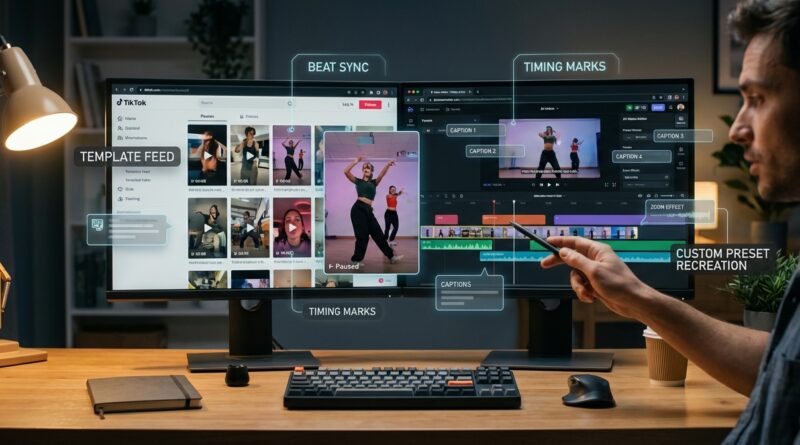
Here is the good news. A lot of that “native TikTok” look is not magic, and it is not even really about CapCut. It is about layout. More specifically, timing layout. If you can study one strong TikTok template, copy its rhythm, then save that rhythm as your own reusable preset in an AI-first editor, you can get the same fast, current feel without bouncing between five apps. Think of it as a one-click viral layout hack. You are not stealing someone’s content. You are learning the structure that makes short videos easier to watch.
⚡ In a Hurry? Key Takeaways
- Use TikTok’s own templates and auto-cut tools as a timing guide, then rebuild that pacing in your main editor as a reusable preset.
- Focus on beat length, caption stacking, punch-ins, and cut timing. Those four things create most of the “native” feel.
- This is safest and most useful when you copy structure, not someone else’s footage, branding, or exact text.
What this tiktok reel editing layout hack actually means
Let’s make this simple.
The hack is not about downloading a trendy template and hoping for the best. It is about reverse engineering the layout logic inside TikTok’s built-in edit styles, then moving that logic into the editor you actually like using.
That could be Descript, VEED, Premiere Pro, Final Cut, Canva, Riverside, or any AI-first editor that lets you save text styles, zooms, cuts, and timing markers.
You are basically asking four questions:
1. How long does each shot stay on screen?
Some templates cut every 0.7 seconds. Others hold for 1.5 seconds, then speed up in the middle. That pacing matters more than people think.
2. When do captions change?
Not just what the captions say. When they appear. Native-looking edits often change text on the beat or right before it.
3. Where do the zooms land?
A slight punch-in on a key word can make a boring talking clip feel intentional.
4. How much visual repetition is there?
Many good short-form layouts repeat the same three or four moves. That repetition is what makes them feel clean instead of chaotic.
Why small creators keep missing this
Most people think the gap between them and bigger creators is gear, time, or creativity.
It often is not.
The real gap is layout literacy. Knowing how long a beat holds. Knowing where text should sit. Knowing when to cut before attention drops. Big creators either learned this by trial and error, or they have editors who did.
The nice part is that TikTok is quietly giving you free examples every day. Templates, auto-cut tools, and built-in editing suggestions are not toys. They are little lessons in what the platform currently likes to watch.
If you already care about visual consistency too, this pairs nicely with Steal This ‘AI Template Stack’ To Make Every Reel Look Branded In Under 15 Minutes, which is all about making your content feel like it belongs to the same creator across posts.
How to steal TikTok’s native edit style without opening CapCut
Step 1: Pick one high-performing layout, not ten
Do not study a random pile of viral videos. That gets messy fast.
Pick one TikTok template or one style of edit that keeps showing up in your niche. Maybe it is:
- Fast talking-head cuts with big center captions
- B-roll over voiceover with 3-word text chunks
- Photo carousel to beat-sync motion edit
- Hook sentence, punch-in, then fast proof clips
One is enough to start. Your goal is not to become a copy machine. Your goal is to spot the skeleton underneath the edit.
Step 2: Map the timing by hand once
This sounds annoying, but it only takes a few minutes.
Open the TikTok template or finished video and write down:
- Opening hook length
- Average clip length
- Moments where text changes
- Zoom or punch-in moments
- Music beat drops or pauses
- End-card or CTA timing
You do not need frame-perfect math. You just need a usable pattern.
For example, your note might look like this:
- 0:00 to 0:01.5. Bold hook text
- 0:01.5 to 0:04. Fast cuts every 0.8 sec
- 0:04. Punch-in on key sentence
- 0:05 to 0:09. B-roll with captions in 2-line chunks
- 0:09 to 0:11. Pause beat, on-screen proof
- 0:11 to 0:14. CTA with slower hold
That is your blueprint.
Step 3: Rebuild that blueprint inside your editor
Now go to the editor you actually want to keep using.
Create a project with:
- Markers at each cut point
- Your caption style already saved
- Preset zooms or scale keyframes
- Default sound effect or beat markers
- A placeholder hook, body, proof, and CTA section
Save it as a template.
This is the real trick. Instead of opening TikTok or CapCut every time to “feel it out,” you now drop your new script into a pre-timed layout.
Step 4: Make the template flexible, not rigid
A good viral layout preset is a guide, not a cage.
If every clip must be exactly 0.8 seconds forever, your content will start feeling stale. Save ranges instead:
- Hook hold. 1 to 1.5 seconds
- Main cuts. 0.7 to 1 second
- Proof moment. 1.5 to 2 seconds
- CTA hold. 1 to 2 seconds
That keeps the native feel while still letting each post breathe.
The four ingredients that make an edit feel “TikTok native”
Caption stacking
Native captions are usually not full subtitles dumped on screen. They are shaped for speed. Short chunks. Clear line breaks. Important words near the middle of the screen where your eyes already are.
If your captions look like a court transcript, the edit will feel off even if the cuts are solid.
Beat-matched changes
You do not need every cut to hit the music exactly. You do need some visible changes to land where the brain expects them.
That could be:
- A cut on the beat
- A caption word swap on the beat
- A zoom just before the beat
- A proof screenshot right after the beat drop
Punch-ins with a reason
Random zooming looks amateur. A small punch-in on the sentence that matters most looks intentional.
Use it when you say:
- The result
- The surprise
- The mistake
- The payoff
Pattern repetition
This is the part most people miss. Native-looking edits often repeat a visual rhythm. Text, cut, text, punch-in, B-roll, repeat. Your viewer learns the pattern without noticing it. That makes the video feel smoother and easier to follow.
What tools make this easiest?
You can do this in almost any decent editor, but AI-first tools help because they speed up the boring parts.
Useful features to look for:
- Auto-transcription with editable captions
- Text-based editing
- Saved templates or brand presets
- Auto silence removal
- Quick resize for TikTok and Reels
- Easy keyframe zooms
The point is not to find a magic app. The point is to build one portable layout system that survives if TikTok changes a button or CapCut gets replaced by the next shiny thing.
What not to copy
There is a line here, and it is worth keeping clear.
Copy the structure. Do not copy the creator.
That means:
- Good to copy. Shot timing
- Good to copy. Caption pacing
- Good to copy. Zoom placement logic
- Not good to copy. Their footage
- Not good to copy. Their exact words
- Not good to copy. Their logo, color system, or signature gimmick
You are studying editing grammar, not tracing somebody’s homework.
A simple workflow you can use this week
If you want the short version, do this:
- Find one TikTok or Reel in your niche with pacing you like.
- Write down the cut timing for the first 15 seconds.
- Notice where captions change and where zooms happen.
- Build those timings into your editor as markers.
- Save the text style, transitions, and zooms as a template.
- Drop in your next script and swap your own clips.
- Test it on three videos before changing the layout.
That last part matters. Most creators change their editing style too often to learn anything from the results.
Why this saves more time than chasing every trend
Opening a new app for every trend feels productive. It is usually not.
What actually speeds you up is having a repeatable layout you trust. Once the pacing blueprint is built, you stop making 50 tiny decisions on every edit. You just fill in the blanks.
That means faster turnaround, steadier quality, and better odds your videos will hold attention long enough to matter.
At a Glance: Comparison
| Feature/Aspect | Details | Verdict |
|---|---|---|
| Using TikTok templates directly | Fast to try, but you stay inside TikTok’s workflow and get limited control over branding and reuse. | Good for research, not ideal as your full editing system. |
| Rebuilding the layout in your own editor | Takes a little setup once, then gives you a reusable preset for captions, cuts, punch-ins, and timing. | Best long-term move for speed and consistency. |
| Copying a creator shot-for-shot | May look current for a minute, but it weakens your own voice and can feel lazy or risky. | Avoid it. Copy the structure, not the identity. |
Conclusion
If your edits keep feeling one step behind, the fix is probably not another app. It is learning the layout underneath the app. Right now, the biggest gap between small creators and the top 1 percent is not ideas, it is layout literacy. Knowing exactly how long a beat holds, how captions stack, and where zooms and punch-ins actually land. TikTok and other short-form tools are quietly shipping hyper-optimized templates and auto-cut tools that most people treat as disposable toys, but they are really free film school. Reverse engineer one or two strong templates into a reusable viral layout preset inside your editor, and you suddenly have a portable timing blueprint you can drag onto any script this week. That means faster edits, more consistent watch time, and a look that feels current without chasing every new app or getting stuck in one ecosystem.