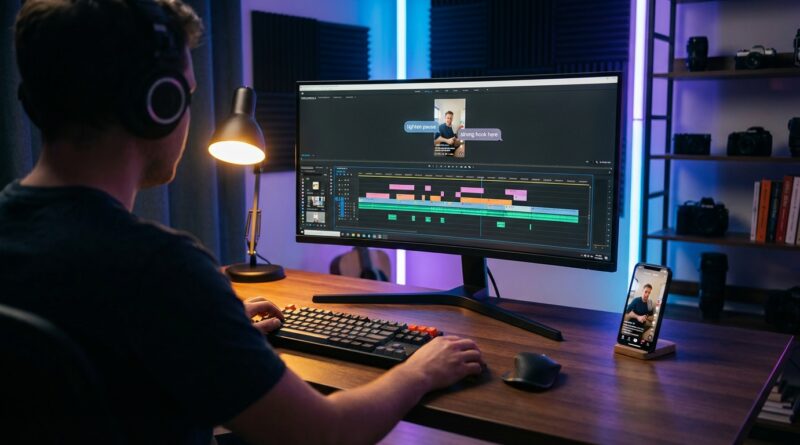
The ‘One‑Timeline AI Review’ Hack: How Smart Playback Notes Can Fix Your Reels In 15 Minutes
You know the drill. You open a 60-second reel, promise yourself this edit will be quick, then spend the next hour dragging the playhead back and forth trying to figure out why it still feels off. The hook lands weak. There is a half-second pause that somehow feels huge. The captions are technically correct but weirdly stiff. Then comes the worst part. Export, upload, rewatch on TikTok, check Instagram, maybe test YouTube Shorts too. By then, your audience would have spotted the problem in three seconds.
That is where the one-timeline AI review trick helps. Instead of doing five separate “vibe checks,” you run one smart review pass on your rough cut and let an AI tool flag the boring but important stuff fast. Think pacing dips, filler words, dead air, caption timing, repeated shots, weak openings, and spots where the on-screen text fights the visuals. It is not magic, and it will not replace taste. But if you are using ai video editing tools for social media creators, this is one of the easiest ways to cut review time down to about 15 minutes and make better posts more consistently.
⚡ In a Hurry? Key Takeaways
- Use one AI review pass on your rough cut to catch pacing, hook, caption, and dead-air issues before exporting to every platform.
- Ask the tool for timestamped notes in a single timeline so you can fix the reel in one editing session instead of repeated reuploads.
- AI can speed up feedback, but you still need to make the final call on tone, humor, and brand style.
What the “one-timeline” hack actually is
The idea is simple. Put your rough cut through one AI review workflow that watches the whole reel and gives you notes tied to exact timestamps. Not a vague summary. Not “make it more engaging.” Real notes you can act on.
For example, a good review pass might say:
- 0:00 to 0:02. Hook starts too slow.
- 0:07. Pause between lines feels awkward.
- 0:14. Caption covers product shot.
- 0:21 to 0:26. Energy drops, trim two seconds.
- 0:38. Repeated phrase weakens the point.
- 0:52. Ending lacks a clear payoff or call to action.
That is the whole win. Everything shows up in one place, on one timeline, before you start posting test exports everywhere.
Why this matters more now than it did a year ago
Social feeds are full of polished-looking clips. Looking polished is no longer enough. What stands out now is speed plus taste. Can you react fast and still make something that feels human, clear, and worth watching?
That is why ai video editing tools for social media creators are getting so much attention. The smart use of AI is not “make the whole video for me.” It is “help me spot what my tired eyes keep missing.”
If you are a solo creator, marketer, coach, or small brand, this matters a lot. You do not need a full post-production team. You need a tighter feedback loop.
How the 15-minute review loop works
Minute 1 to 3. Export one rough cut
Do not wait until it is perfect. Export the rough version with your current captions, music, and cuts. The point is to review the actual viewing experience, not just the project file in your editor.
Minute 4 to 7. Run an AI analysis
Use a tool that can inspect the video itself, transcript, captions, and pacing. Some tools focus on transcription and filler words. Others are better at scene rhythm, text placement, or hook strength. You do not need ten apps. One decent pass is enough to expose the obvious problems.
Minute 8 to 12. Fix only the flagged moments
Open your timeline and work through the notes in order. This is the beauty of it. You are not rewatching blindly. You are making targeted fixes.
Minute 13 to 15. Do one final human watch
Now watch it once all the way through like a normal viewer. No stopping. No scrubbing. If it flows, publish it.
What AI is good at catching
AI review is especially handy for boring mistakes that cost watch time.
- Weak hooks. If the first two seconds meander, people leave.
- Dead air. Tiny pauses feel much bigger in short-form video.
- Caption issues. Poor timing, awkward line breaks, or text covering faces and products.
- Transcript clutter. Too many filler words can make your delivery drag.
- Energy dips. A section may be fine on its own but flat in the middle of a reel.
- Visual repetition. Similar cuts in a row can make the video feel longer than it is.
Those are exactly the things viewers react to fast, even if they cannot explain why.
What AI is not good at
This part matters. AI can point out friction. It cannot fully understand your voice, your audience’s inside jokes, or the difference between “awkward and bad” versus “awkward but funny on purpose.”
So use it as a reviewer, not a director. If the tool says your intro is too abrupt, but your audience likes that punchy style, ignore the note. You are still the editor.
The prompts that make this work better
A lot of people get weak results because they ask weak questions. If your tool allows custom prompts, keep them plain and specific.
Try prompts like these
- Review this reel for pacing problems and list exact timestamps.
- Tell me where viewers are most likely to scroll away in the first 10 seconds.
- Check whether captions are easy to read and not covering important visuals.
- Find filler words, long pauses, and repeated points that can be trimmed.
- Rate the strength of the hook, middle, and ending, then suggest tighter alternatives.
- Flag any section that feels more suited to TikTok than Instagram or YouTube Shorts.
You are not asking for a masterpiece. You are asking for clean, practical notes.
How to use this across TikTok, Instagram, and YouTube Shorts
One smart review pass can help you stay consistent without making three totally different edits every time.
TikTok
Usually rewards a faster start and a more casual feel. AI notes can help spot a slow opening or a section where the joke arrives too late.
Instagram Reels
Often needs cleaner captions and tidier visuals. If text placement is messy, Instagram viewers notice quickly.
YouTube Shorts
Can handle slightly more structure, but dead sections still hurt. A review pass helps trim the middle so retention stays stronger.
The point is not to rebuild from scratch for each app. It is to catch platform-sensitive issues before they become public.
Picking the right kind of tool
When people search for ai video editing tools for social media creators, they often get buried under giant feature lists. Keep it simple. You want tools that do at least one of these well:
- Timestamped feedback on pacing and structure
- Accurate transcription and caption cleanup
- Detection of silence, filler words, or repeated phrases
- Easy previewing in a mobile-style vertical format
- Fast export or direct integration with your editor
If a tool promises everything, be careful. The useful ones usually solve one or two review problems really well.
A realistic example
Let’s say you made a 58-second reel about a new product launch.
Without the one-timeline review, you might watch it six times and still miss the fact that your strongest line does not appear until second eight. You may also miss that your captions cover the product at second 19, and that your ending fades out without telling people what to do next.
With one AI pass, those notes come back in under a few minutes. You move the best line to the front, tighten one pause, shift the captions higher, and add a direct ending. Same reel. Better result. Less guesswork.
The biggest mistake to avoid
Do not use AI notes to keep editing forever.
This trick works because it shortens the loop. If you run five AI passes, compare three summaries, and keep tweaking tiny details no viewer will notice, you are back where you started. Pick one review pass, fix the clear problems, then post.
At a Glance: Comparison
| Feature/Aspect | Details | Verdict |
|---|---|---|
| One-timeline AI review | Gives timestamped notes on pacing, hook strength, captions, dead air, and structure in a single pass. | Best for saving time and catching obvious problems fast. |
| Manual rewatch on multiple platforms | Requires repeated exports, uploads, and side-by-side checking on TikTok, Instagram, and YouTube. | Still useful as a final check, but too slow as your main workflow. |
| Human judgment | Catches tone, humor, brand fit, and whether the video feels genuinely worth watching. | Always necessary. AI should support this, not replace it. |
Conclusion
If editing reels has started to feel like endless scrubbing, second-guessing, and platform hopping, this is a refreshingly practical fix. Right now social feeds are flooded with AI-generated clips, but what is actually winning is speed plus taste. A simple AI review pass gives solo creators and small teams a way to get pro-level feedback on every rough cut without hiring an editor or burning hours doing vibe checks on five different apps. It compresses the boring part of editing into one tight loop so you can publish more often, keep quality consistent across TikTok, Instagram, and YouTube, and react to trends the day they pop instead of the week after. In short, use AI to spot the friction, trust yourself to make the call, and get the reel out the door.