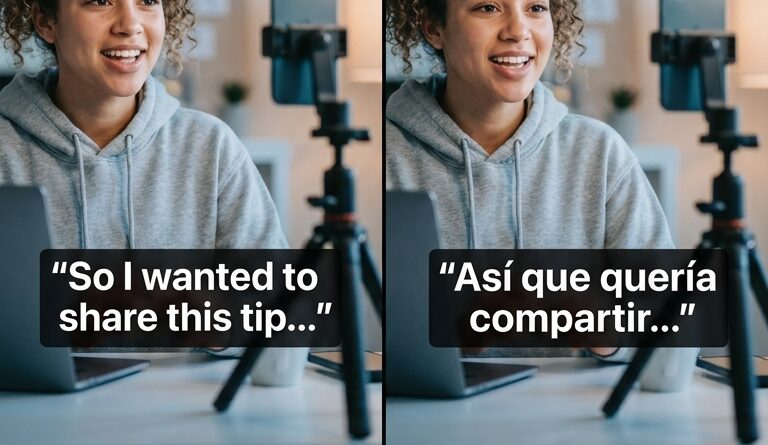
The ‘Bilingual Caption Stack’ Hack: Turn One Edit Into Native‑Level Videos For Two Languages
You know the feeling. The video is finally done, the cuts are clean, the hook lands, the captions look good, and then it hits you. You also need a Spanish version. Maybe Portuguese. Maybe French. Suddenly one finished Reel turns into three timelines, three rounds of subtitle fixes, and a small crisis over whether auto-translate just turned your punchline into nonsense. That is where a lot of creators stop. Not because the audience is not there, but because the extra work is brutal. The good news is this is getting easier fast. If you are wondering how to add bilingual captions to instagram reels and tiktok videos, you no longer need a totally separate edit for every language. Apps like Instagram Edits and newer caption tools can now generate, translate, and style two language tracks from the same project. Done right, this becomes a repeatable system, not a one-off headache.
⚡ In a Hurry? Key Takeaways
- You can add bilingual captions to Instagram Reels and TikTok videos by creating one clean caption track first, then using built-in translation or a caption app to generate a second language layer.
- Start with the language your analytics already suggest, not the one that feels most ambitious. English plus Spanish or Brazilian Portuguese is often the easiest win for US-based creators.
- Always proofread the first three lines, the hook, slang, and any call to action. Auto-translation is much better now, but it still trips over jokes, idioms, and product names.
The simple idea behind the bilingual caption stack
Think of it as one video, one edit, two readable text layers.
Your base layer is the original language. Your second layer is the translated language. Instead of making a duplicate timeline and rebuilding subtitles from scratch, you create a caption setup that can travel with the same clip. That is the hack.
It matters because short-form video lives or dies on speed. If localizing one Reel takes another hour, most solo creators will skip it. If it takes five extra minutes and a quick proofread, you will actually do it.
First, pick your “growth language” the smart way
Before you touch captions, decide which second language deserves your time.
Check your existing analytics
Look at where your views, saves, shares, or profile visits already come from. If your audience is already showing up from Mexico, Colombia, Argentina, or Spanish-speaking communities in the US, Spanish is the obvious first test. If you are seeing Brazil, go with Brazilian Portuguese, not European Portuguese. Those are not interchangeable in tone.
Do not start with four languages
Start with one second language. That is enough to prove whether this workflow helps reach, retention, or follows. If it works, then expand.
Choose the language that matches your niche
A fitness creator and a software tutorial creator may get very different results from the same language choice. Pick the one closest to the audience that already cares about your topic.
Why your on-screen text needs a small rewrite before translation
This is the part people skip. Then they blame the app.
Auto-translation works best when your original captions are short, direct, and boring in the best possible way. Clear beats clever.
Write for translation, not just for style
Good source caption: “3 things ruining your audio.”
Risky source caption: “Your sound is low-key cooked.”
The second one may make perfect sense to your audience in English. It may also turn into complete gibberish in another language.
Keep each line short
Try to keep caption lines compact. Long lines wrap badly on phones, especially when you are stacking two languages. If one line takes up half the screen, viewers will stop reading.
Avoid culture-heavy slang in the hook
The first sentence matters most. If the hook sounds weird after translation, the whole video feels off. Use plain language for the opening line, then add personality in your delivery.
How to add bilingual captions to Instagram Reels and TikTok videos
There is no single perfect app for everyone, but the workflow is similar across Instagram Edits, TikTok’s caption tools, and third-party apps.
Step 1: Finish the actual edit first
Do your trim cuts, b-roll, zooms, and music timing before building bilingual captions. If you keep changing the structure after the captions are generated, you create extra cleanup work.
Step 2: Generate your primary captions
Use the app’s auto-caption feature in your original language. Then review every line. Fix names, jargon, and punctuation. This clean first pass matters because the translated layer will usually depend on it.
Step 3: Translate into one target language
In Instagram Edits, the newer caption options are getting better at translation-aware styling. In other tools, you may see options for translated subtitle tracks or duplicate caption layers. Pick one language and generate the translated captions from your cleaned original track.
Step 4: Stack the languages in a readable way
This is where most videos become either helpful or a mess.
Best practice is simple:
- Keep the original language on top or in your usual caption position.
- Put the translated line directly below it.
- Use slightly smaller text for the second language.
- Keep contrast high. White text with a dark background box usually works best.
- Do not let captions cover a speaker’s mouth, a product demo, or a key visual.
Step 5: Proofread the parts that matter most
You do not need to rewrite every line from scratch. Focus on:
- The first three caption blocks
- Your call to action
- Any joke or slang
- Brand names or product terms
- Numbers, prices, dates, and measurements
Step 6: Save the style as a preset or template
This is the real time-saver. Once your font, position, size, and two-language layout look good, save that setup. Your next 20 clips should not start from zero.
A practical caption layout that works on phones
If you want a safe default, use this:
- Primary language in medium bold text
- Translated language in slightly smaller regular text
- Two lines max per language block
- Bottom-center placement, but raised high enough to avoid app buttons
- Consistent highlight color only for keywords in the top language
That last point is important. If both languages are heavily color-coded, the screen gets busy fast.
What Instagram Edits changes for creators
Instagram’s Edits app is moving in the direction creators have wanted for years. One project, cleaner templates, better caption generation, and translated text that does not force a full second export path for every language version.
It is not magic. You still need to check accuracy. But for short-form creators, this is a meaningful shift. The tools are finally starting to respect the fact that your audience may not all speak one language, and your workflow should not collapse because of that.
What to do on TikTok if you want the same result
TikTok’s native tools can help with captions, but bilingual presentation often still depends on how much control the app gives you at the moment you are editing. If built-in options feel limited, use a third-party caption tool first, export the finished video with both languages visible, and then upload to TikTok.
The key is consistency. Use one bilingual style across Reels and TikTok so your videos look intentional, not patched together.
Third-party apps are worth using when native tools fall short
If Instagram or TikTok does not give you enough control over placement, timing, or translation cleanup, a third-party caption app can be the better route. Many now support auto-captions, translation, templates, and reusable styles.
What you want is not “the smartest app.” You want the app that lets you fix mistakes quickly and save a repeatable layout.
Common mistakes that make bilingual captions harder to read
Too much text at once
If viewers are reading instead of watching, you have overdone it. Break lines more often.
Putting both languages in the same font weight and size
This makes the screen feel crowded. Give the translated line a lower visual priority.
Translating text overlays manually every time
If your hooks and callouts are recurring, build them into a reusable template. “3 mistakes,” “watch this,” and “save this” should not need to be redesigned every time.
Forgetting safe zones
Platform buttons and captions can overlap. Always preview on a phone screen before posting.
A repeatable workflow for the next 20 clips
Here is the easy version you can actually stick with:
- Edit the video fully in one timeline.
- Create clean captions in your main language.
- Translate into one second language.
- Stack both languages in a consistent style.
- Proofread only the high-risk lines.
- Save the bilingual format as a preset.
- Use the same setup on every clip until the analytics tell you to change course.
That is the whole system. It is not flashy. It just works.
Is this worth it for small creators?
Yes, especially if your niche already crosses borders.
If you are a solo creator, coach, educator, reviewer, or small brand, bilingual captions can widen your reach without doubling your production time. That is the sweet spot. You are not trying to build a giant localization department. You are trying to make one good video understandable to more of the people already likely to care.
At a Glance: Comparison
| Feature/Aspect | Details | Verdict |
|---|---|---|
| Native app captions | Fastest option for Reels and TikTok. Good for auto-captions and basic translation, but control can be limited. | Best for speed and simple bilingual posts. |
| Third-party caption tools | Usually offer better styling, templates, and translation cleanup. Adds one more app to your workflow. | Best when you need polished, reusable bilingual layouts. |
| Manual separate language versions | Most accurate if heavily reviewed, but slow and annoying for short-form creators. | Only worth it for high-stakes campaigns or large teams. |
Conclusion
For years, creators had to choose between reaching more people and keeping their sanity. That trade-off is finally getting smaller. Platforms are catching up with tools that make translation-aware captions practical, not painful. If you build one clean source caption track, pick a smart second language based on your audience, and save a bilingual template you can reuse, you turn one finished edit into something much bigger. Not with triple the work. Just with a better system. That is the real win here. You do not need to become a localization expert. You just need a workflow that helps your videos read naturally in two languages and gets you back to making the next clip.