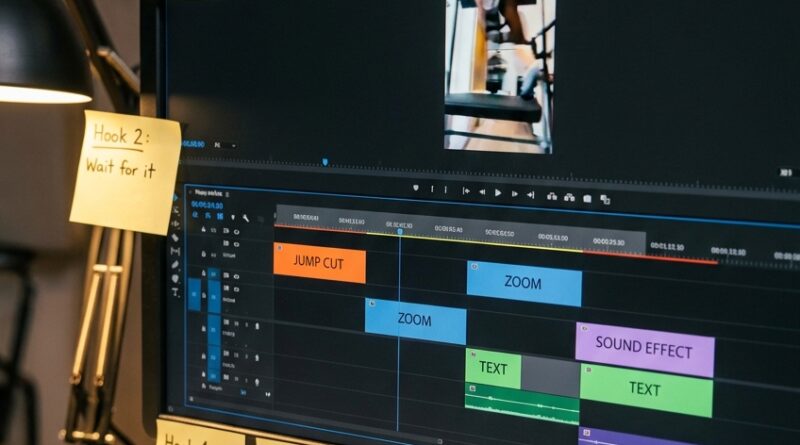
The ‘Hook-Map Timeline’ Hack: Pre‑Build Your First 3 Seconds So Every Edit Starts Strong
Blank timelines are where good reels go to stall. You open CapCut or Premiere, drop in a few clips, and then spend 20 minutes fiddling with the first three seconds like you are trying to crack a safe. That is exhausting, and worse, it usually leads to a weak opening. If you are trying to figure out how to edit stronger hooks for TikTok and Reels, the fix is not more guessing. It is a simple pre-built structure.
A hook-map timeline is exactly what it sounds like. You build a reusable first-three-seconds template with markers for your opening line, visual change, text punch, and payoff teaser. Then every new video starts with a tested map instead of a blank canvas. It saves time, cuts decision fatigue, and gives your edits a much better shot at holding people long enough to watch the rest.
⚡ In a Hurry? Key Takeaways
- A hook-map timeline is a reusable first-three-seconds edit template that helps your TikToks and Reels start stronger.
- Set up markers for voice line, text overlay, pattern interrupt, and payoff tease so you can drag fresh clips into a proven opening structure.
- This does not make your videos robotic. It simply removes the panic and helps you publish faster with steadier retention.
Why the first three seconds feel so hard
Because they carry too much weight. Your opening has to stop the scroll, explain what is worth watching, and create enough curiosity for someone to stay.
That is a lot to ask from a random clip on a blank timeline.
Most creators treat this moment like a mood. They test one intro. Then another. Then they zoom text in, zoom it out, trim the pause, add a sound effect, change the font, and suddenly the edit is taking twice as long.
The platform does not care how long it took. It only cares whether people kept watching.
What a hook-map timeline actually is
Think of it like a saved track layout for attention.
Instead of starting from zero, you build a timeline preset for the opening three seconds of your short-form videos. Inside that preset, you place visual and timing markers for the parts that tend to work best.
A simple hook map might include:
- 0.0 to 0.7 seconds: strongest visual or face shot
- 0.2 to 1.5 seconds: bold on-screen text with the main promise
- 0.8 to 1.8 seconds: spoken hook or caption line
- 1.5 to 2.2 seconds: pattern interrupt, like a cut, zoom, screenshot, or B-roll switch
- 2.0 to 3.0 seconds: payoff tease, proof, or “here’s what happened” setup
That is your map. Not your whole video. Just the opening structure.
Why this works better than “just be creative”
Creativity is great. Panic is not.
A hook-map timeline works because it turns a fuzzy creative task into a repeatable workflow. You are no longer asking, “How should this start?” You are asking, “Which clip fits slot one best?” That is a much easier question.
It also helps on low-energy days. You do not need a spark of genius every time you edit. You need a system that gives you a reliable start.
How to build your first hook-map timeline
1. Study your own best openings
Go back through your last 10 to 20 Reels or TikToks. Find the ones with better retention or stronger early watch time. You do not need a viral hit. You just need patterns.
Look for things like:
- Did you start with your face or with the result?
- How quickly did text appear?
- Was there a cut in the first second?
- Did the hook ask a question, make a claim, or show proof?
You are hunting for repeatable moves, not magic.
2. Pick one hook pattern to start with
Do not build six templates on day one. Start with one.
For example:
- Problem-first hook: “Your Reels are dying because your opening is too slow.”
- Result-first hook: “This one edit change doubled my hold rate.”
- Mistake-first hook: “Most people waste the first second doing this.”
Choose the pattern that matches your content style most often.
3. Create markers on the timeline
Open your editor and make a short sequence or project preset. Add markers at key points in the first three seconds. Label them clearly.
For example:
- 0:00 Start with strongest frame
- 0:20 Text on screen
- 0:80 Spoken promise lands
- 1:50 Visual change
- 2:10 Proof or tease
Now save that as your hook-map template.
4. Add placeholder layers
This is where it gets practical. Put empty text boxes, audio tracks, and adjustment layers in the places you usually need them.
That means when you start a new edit, you are replacing placeholders instead of building everything from scratch.
If your workflow mixes app editing with desktop cleanup, it can also help to read The ‘Native-Plus Edit’ Hack: Blend TikTok’s Built‑In Tools With CapCut Or Edits For Faster, Better‑Performing Reels. It is a good companion idea if you want faster edits without losing the native feel.
What to put inside those first three seconds
The timeline map is the container. The contents still matter.
Use a clear promise
People stay when they quickly understand what they are getting.
Good examples:
- “How I fixed muddy audio in 10 seconds.”
- “Why your hook is losing viewers.”
- “The caption change that got more saves.”
Bad hooks are usually vague, slow, or self-focused.
Show something changing
Movement matters. A cut, zoom, crop, screenshot, gesture, or visual swap tells the brain, “Pay attention, this is active.”
You do not need chaos. You just need motion with purpose.
Give a reason to stay
This is the part many people miss. You cannot just say something interesting. You need to suggest that the next few seconds will pay off.
That can be proof, a before-and-after, a hidden mistake, or a fast preview of the result.
Three easy hook-map formats to test
1. The direct-teach map
Best for tutorials, advice, and niche education.
- Start with face and bold claim
- Add text with the exact benefit
- Cut to proof or example before second three
2. The proof-first map
Best for results, case studies, and transformations.
- Start with screenshot, stat, or finished result
- Use voice line to explain why it matters
- Cut to “here’s how” setup
3. The mistake-callout map
Best for crowded niches where people are tired of generic tips.
- Open with the common mistake
- Put the pain in text immediately
- Tease the fix by second two
Common mistakes that make hook maps fail
Making the template too rigid
This is a guide, not a prison. If every video starts with the exact same camera angle, wording, and zoom, viewers will feel it.
Keep the structure. Swap the surface details.
Packing too much into second one
Some creators hear “strong hook” and throw in giant text, three cuts, sound effects, and a headline that reads like a ransom note.
Calm down. Clear beats clever.
Ignoring retention data
If people still drop off in the first seconds, your map needs work. Change one thing at a time. Maybe the text is too late. Maybe the spoken line takes too long to reach the point. Maybe the first frame is weak.
The system gets better when you treat it like a draft, not a finished masterpiece.
How to know if your hook-map timeline is helping
Look for two signs.
Your edits get faster
If you are spending less time building the opening, the system is doing its job.
Your early retention gets steadier
You may not go viral overnight. That is not the test. The real test is whether your first seconds become more consistently solid across multiple posts.
That consistency is where growth usually starts.
At a Glance: Comparison
| Feature/Aspect | Details | Verdict |
|---|---|---|
| Blank-timeline editing | Every new Reel starts from scratch, which slows decisions and often weakens the hook. | Fine for one-offs, poor for consistency |
| Hook-map timeline | Uses saved markers, text slots, and visual beats for the first three seconds. | Best choice for faster, stronger short-form edits |
| Creative flexibility | You keep changing clips, wording, and visuals while reusing the same proven opening structure. | Good balance of system and originality |
Conclusion
The first three seconds are not the place to wing it anymore. Platforms are brutally honest, and viewers decide fast. The good news is you do not need to be “naturally great at hooks” to compete. You just need a system. A hook-map timeline turns your strongest opening pattern into a reusable editing asset, so even on tired days you can drop clips into a tested structure and publish faster with more consistent retention. That is the real win. It takes “having a good hook” out of your head and puts it into your workflow, where it belongs.