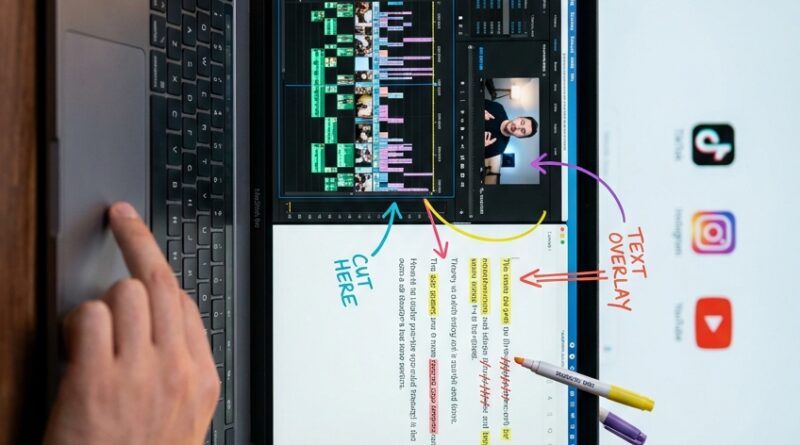
The ‘Caption-First Edit’ Hack: Let AI Rewrite Your Cut From The Text Up
If you make Reels or TikToks, you probably know this pain far too well. You record a simple talking-head clip, open your editor, and then waste an hour dragging tiny bits of video around just to remove “ums,” tighten the intro, and fix the ending. Then the hook changes. Or your call to action feels weak. So you do it all again. That is why text based video editing for reels and tiktok is catching on so fast. Instead of hunting through the timeline, you edit the transcript like a document. Delete a line, move a sentence, trim filler, and the software rebuilds the cut for you. For short-form creators, this is not some fancy extra. It is a practical way to post more often without losing your mind. If your videos are mostly you talking, demoing a product, or explaining something on camera, this one workflow change can save you a shocking amount of time.
⚡ In a Hurry? Key Takeaways
- Text based video editing for reels and tiktok lets you cut video by editing the transcript instead of scrubbing the timeline.
- Start by using it on talking-head clips, product demos, tutorials, and voice-led videos where the spoken words drive the edit.
- It saves serious time, but always check captions, jump cuts, and sentence order before posting so the final clip still feels natural.
What the “caption-first edit” hack actually means
The name sounds more complicated than it is.
You drop your raw footage into an editor that can transcribe speech. The app creates text from your video. Then you make your first round of edits by working on that text.
Delete filler words. Cut off-topic lines. Move your strongest sentence to the top. Shorten your ending. Clean up the call to action.
As you do that, the software updates the actual video cut to match.
That is the trick. You are not staring at waveforms and little timeline blocks for every tiny change. You are shaping the message first, then letting the editor rebuild the video around it.
Why this matters so much for short-form video
A lot of creators assume transcript editing is mainly for podcasts, interviews, or long YouTube episodes.
That is old thinking.
Short-form creators may get even more value from it because the margin for error is tiny. In a 20 to 45 second clip, one weak opening line can kill retention. One rambling sentence can make the whole thing feel slow. One clunky CTA can hurt conversions.
With text based video editing for reels and tiktok, you can test those changes fast.
You can fix the part viewers care about most
The first one to three seconds matter more than almost anything else in short-form video. If your strongest line is buried 18 seconds into the clip, a normal timeline edit can turn into a tedious mess.
With transcript editing, you can pull that sentence to the front in seconds and see if the clip works better.
You can make multiple versions without starting over
This is where the time savings really show up.
Say you film one product demo. From that one take, you can quickly create:
- A curiosity-based hook version
- A problem-solution version
- A punchier CTA version
- A shorter version for tighter retention
That is much easier when your edits begin as line changes in a transcript instead of a full manual re-cut.
Who should use this first
This works best when spoken words are the backbone of the clip.
Great fit
- Talking-head videos
- Product demos
- How-to clips
- Commentary videos
- UGC style ads
- Founder videos and personal brand content
Less useful, but still possible
- Fast montage edits with little speech
- Music-led videos
- Highly cinematic clips where timing is driven by visuals, not words
If the video’s main job is “say this clearly and quickly,” this workflow makes a lot of sense.
How to do a text-first edit without overthinking it
1. Record one clean take
You do not need perfection. You do need decent audio. If the app cannot hear your words clearly, the transcript will be messier, and so will the edit.
2. Generate the transcript
Most modern editors can do this automatically. Once the text appears, read it like a rough script, not like a legal document.
3. Cut the obvious junk first
Start with easy wins:
- “Um,” “uh,” and repeated words
- False starts
- Rambling setup lines
- Anything that delays the main point
4. Tighten the hook
Ask yourself one question. If a stranger saw only the first sentence, would they keep watching?
If not, move the stronger line up. You are not married to the order you spoke in on camera.
5. Clean up the CTA
Creators often spend ages polishing the middle, then tack on a weak ending. In text form, it is much easier to spot when your CTA is vague, too long, or buried.
Shorten it. Make it clearer. Then let the editor rebuild the ending.
6. Review the rebuilt cut
This part matters. AI can do the heavy lifting, but you still need human taste. Watch for:
- Awkward jump cuts
- Caption mistakes
- Odd pauses
- Zooms that feel overdone
- Lines that make sense on paper but sound strange out loud
The real time-saving trick is versioning
The best part is not just faster editing. It is faster testing.
Let’s say your original hook is, “Here are three mic mistakes creators make.” Fine. But maybe a better opener is, “Your videos sound cheap for one simple reason.”
Old workflow. Re-cut the front of the clip, retime captions, fix transitions, adjust the pacing, export again.
New workflow. Swap the sentence in the transcript, check the rebuilt cut, and export another version.
That means you can test ideas while they are still fresh instead of talking yourself out of them because the re-edit sounds annoying.
What this does better than classic timeline editing
Classic timeline editing is still useful. It gives you fine control. It is still the right choice for heavy visual edits, layered b-roll, motion graphics, and precise beat matching.
But for short, speech-driven videos, timeline-only editing often turns a simple message problem into a slow mechanical task.
Text-first editing flips that around.
You edit meaning first
You focus on what is being said, in what order, and how fast it lands.
You reduce “hunt and peck” editing
No more dragging the playhead around trying to find that one sentence you remember saying somewhere near the middle.
You make late changes less painful
If a brand wants a softer CTA, or you realize your hook is too generic, you can fix it without rebuilding the whole thing by hand.
Common mistakes to avoid
Do not trust the transcript blindly
Auto-captions are much better than they used to be, but they still miss names, products, slang, and fast speech. Always proofread.
Do not cut every breath
Some creators get carried away and remove every tiny pause. The result can feel robotic. Clean and tight is good. Overprocessed is not.
Do not let automation flatten your personality
Sometimes the slightly messy line is the charming one. Keep the bits that sound like you.
Do not ignore the visual rhythm
Even in text based video editing for reels and tiktok, the final product is still a video. Make sure the cuts feel good to watch, not just good to read.
A smart combo for creators who post a lot
If you are trying to build a repeatable short-form workflow, this pairs nicely with other AI shortcuts. Once your transcript-driven cut is done, your next bottleneck is often picking the cover frame.
That is where The ‘One-Click Thumbnail Brain’ Hack: Let AI Pick Your Best Frame And Stop Guessing Your Cover Image fits naturally. It tackles the annoying last step that many creators still do by guesswork.
Put simply, one tool helps you shape the message faster. The other helps you package it faster.
When this workflow feels almost magical
There are a few moments when text-first editing really shines:
- You filmed one long take and need three short clips from it
- You want to test different hooks on the same footage
- You need to remove a bad sentence without reopening a giant project
- You want captions and cuts to stay in sync automatically
- You are posting daily and need speed more than perfect cinematic polish
That last point is the big one.
Most creators do not fail because they lack ideas. They fail because the workflow becomes too heavy to keep up with. Anything that cuts editing friction matters.
At a Glance: Comparison
| Feature/Aspect | Details | Verdict |
|---|---|---|
| Speed for talking-head edits | You cut by deleting or moving lines in the transcript instead of trimming every clip by hand. | Big win for daily creators. |
| Testing hooks and CTAs | You can create multiple script variations from one recording without rebuilding the whole timeline. | Excellent for Reels, TikTok, and Shorts. |
| Accuracy and polish | Auto-cuts and captions still need a final human review for pacing, wording, and visual flow. | Fast, but not fully hands-off. |
Conclusion
Text-first editing is quietly becoming one of the biggest time wins in 2026, and it is not just for podcasters or long YouTube videos. For short-form creators, it is a very practical shortcut. You import your raw clip, auto-generate a transcript, and do the first edit in text form by deleting filler, tightening the hook, moving the strongest line to the front, and cleaning up your CTA. Then the editor rebuilds the video cut around that script, with jump cuts, zooms, and captions updating automatically. The result is simple but powerful. You can film once, spin out three or four variations in minutes, test new hooks without re-editing from scratch, and fix last-minute mistakes with a line edit instead of a full re-cut. If you are trying to post consistently without burning out in the timeline, text based video editing for reels and tiktok is one of the smartest workflow changes you can make.