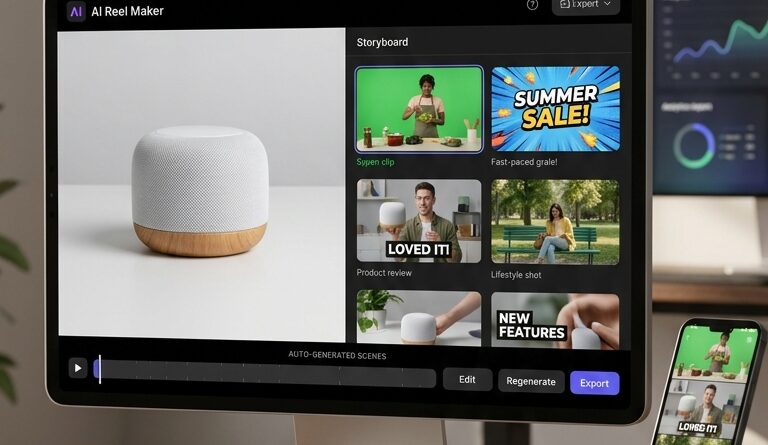
The ‘Static-to-Scroll’ Hack: Turn One Product Photo Into 5 Test-Ready Reels With Zawa’s AI Reel Maker
You can feel the content treadmill, can’t you. Your phone is packed with clean product photos, but your reel folder is the same three clips recycled again and again. Then the views stall, the hooks blur together, and suddenly “just post more video” sounds like advice from someone with a full studio and an editor on payroll. If you are trying to turn product photos into reels with AI, this is the kind of shortcut that actually makes sense. Zawa’s AI Reel Maker, launched on June 26, 2026, is aimed at creators and small brands who need more testable video without booking another shoot. The simple idea is what makes it useful. Start with one strong product image, pick a few believable sales angles, and let the tool generate several vertical reel variations you can test for hooks, pacing, and calls to action. Less busywork. More shots on goal.
⚡ In a Hurry? Key Takeaways
- Zawa’s AI Reel Maker helps you turn one product photo into multiple vertical reels you can test quickly.
- Use one clean hero image, then generate 3 to 5 versions with different hooks, use cases, and CTAs instead of making one “perfect” reel.
- The real value is speed and iteration, but your source image still needs to look sharp and your claims in the video should stay honest.
Why this matters right now
Most small brands do not have a filming problem. They have a production bottleneck.
You already have assets. Product photos. Lifestyle shots. Packaging images. Maybe a few customer pics too. What you do not have is time to stage five fresh shoots every week just to test whether “Get Ready With Me,” “Problem/Solution,” or “Why I Switched” works best.
That is where this static-to-scroll approach is smart. Instead of treating photos as dead assets, Zawa treats them as raw material for motion content. That means you can turn product photos into reels with AI and start testing ideas the same day.
What Zawa’s AI Reel Maker actually does
At its core, the tool takes a still product image and builds short vertical video versions around it.
The useful part is not just the animation. Plenty of apps can fake camera movement. The bigger win is that Zawa is built around selling scenarios. So instead of making one generic moving slideshow, you can create several versions that each push a different angle.
Think in scenarios, not just edits
For example, one product photo could become:
- A “problem first” reel with a pain-point hook
- A quick demo-style reel with benefit text overlays
- A testimonial-flavored version with social-proof wording
- A seasonal or niche-specific variation
- A direct CTA version for retargeting or paid testing
That is the real hack. You are not making one prettier photo. You are making five test-ready pieces of content from one image.
How to turn one product photo into 5 test-ready reels
If you want this to work, do not start by asking the tool to be magical. Start with structure.
1. Pick your strongest image, not your most artistic one
Choose the photo that answers “What is this?” in one second.
That usually means:
- The product is centered and clear
- The lighting is clean
- There is little visual clutter
- The image still looks good when cropped vertically
A moody brand shot can be pretty, but if people cannot instantly read the product on a phone screen, it is the wrong starting point.
2. Build five angles before you generate anything
This saves a lot of random experimenting.
Write down five simple reel concepts:
- Hook 1: “Why everyone keeps reordering this”
- Hook 2: “If you struggle with X, this helps”
- Hook 3: “What makes this different from the cheap version”
- Hook 4: “One small upgrade, daily payoff”
- Hook 5: “Try this before your next [event/use case]”
Now your generated videos have a job to do.
3. Change one variable at a time
When brands test reels, they often change everything at once. New text. New pace. New CTA. New audience angle. Then they have no clue what actually worked.
Better move: keep the image and core offer the same, then vary just one thing per version.
Test:
- Different opening hooks
- Short versus medium pacing
- Soft CTA versus direct CTA
- Benefit-led copy versus curiosity-led copy
This gives you cleaner signals.
4. Export a batch and post fast
The point is not to admire the outputs for three days. Post them.
If one version gets stronger watch time or more saves, make the next batch around that pattern. If another flops, good. You learned cheaply.
That same mindset is why batch systems work so well in general. If you also make talking-head or explainer content, the workflow in The ‘One-Script Batch Edit’ Hack: Turn A Week Of Reels Into Clips In A Single Text Pass fits nicely with this. One method turns long footage into multiple clips. This one turns static assets into multiple video tests.
Who this is best for
Zawa’s AI Reel Maker is not really for big production teams with in-house motion designers. It is best for people who need speed more than polish.
Good fit
- Solo creators selling digital or physical products
- Etsy shops and Shopify brands
- Affiliate marketers testing offers
- Social media managers handling too many accounts
- Founders doing their own content at night
Less ideal fit
- Brands that need highly custom cinematic ads
- Products that require detailed live demonstration
- Teams expecting AI to fix weak messaging
That last one matters. A tool can speed up production. It cannot invent a compelling offer for you.
What makes this better than manually animating photos in an editor
You can absolutely do this by hand in CapCut, Canva, or another editor. Many people do. The issue is time.
Manual editing usually means:
- Import image
- Resize for vertical
- Add zooms and pans
- Write text overlays
- Duplicate timeline five times
- Swap hooks and CTAs
- Re-export everything
That is fine once. It is miserable every day.
Zawa’s pitch is not “video quality no human could make.” It is “stop burning your evening on repetitive setup work.” For busy creators, that is a fair trade.
Three smart ways to use the outputs
1. Organic testing
Post several versions across the week and watch retention, shares, saves, and comments. This tells you which message lands naturally in the feed.
2. Paid ad creative testing
If you run small-budget ads, this is a cheap way to test multiple top-of-funnel hooks before spending money on a full custom shoot.
3. Content library building
This might be the most underrated use. Old product photos stop being dead storage and start becoming reusable video inventory.
One month from now, you are not staring at an empty content calendar. You have a bank of variants to remix, repost, and refine.
What to watch out for
This is the friendly reality check part.
Do not use bad photos and expect good reels
Blurry image in, average video out. The source still matters.
Do not overstuff the screen with text
If every reel looks like a coupon flyer, people scroll. Keep the message simple.
Do not fake use cases that feel unnatural
“Authentic selling scenarios” is the key phrase here. If your product would never be used that way, audiences can smell it.
Do not chase pretty over performance
The winning reel might not be the most polished one. It might just have the clearest hook.
A simple starter workflow to copy
If you want a practical routine, try this:
- Pick 3 top product photos.
- Write 5 hooks for each photo.
- Generate 3 to 5 reel versions per image.
- Post the best 1 or 2 organically.
- Track watch time, clicks, saves, and comments.
- Take the best performer and make 3 more variations from that angle.
That is how you build momentum without filming all week.
At a Glance: Comparison
| Feature/Aspect | Details | Verdict |
|---|---|---|
| Speed | Turns one static product image into several vertical reel variations without a full manual edit session. | Big time-saver for daily posting and fast testing. |
| Creative Testing | Lets you try different hooks, pacing, and CTAs from the same source asset. | Excellent for finding what converts before investing in a shoot. |
| Output Quality | Good enough for social testing, but still depends on having a strong photo and clear messaging. | Best used as a fast content engine, not a replacement for every premium brand video. |
Conclusion
If your camera roll is full of solid product shots and your reel strategy is running on fumes, this is a practical way forward. Zawa’s AI Reel Maker, launched on June 26, 2026, is built exactly for creators and small brands who live on social but do not have time for full shoots or heavy editing. Instead of spending all night in CapCut trying to animate still images by hand, you can drop in your best product photo, choose a few authentic selling scenarios, and let the tool generate multiple ad-ready vertical videos to test hooks, CTAs, and pacing. For the Creators Videos crowd, that is the real win. It turns backlogged photos into a living video library, cuts production time for daily posts, and gives you a cleaner, faster way to learn what actually works in the feed. Not just what looks nice in your gallery.