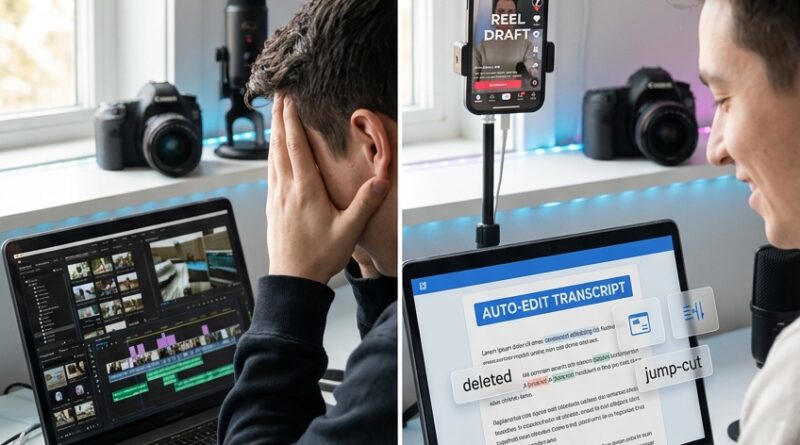
The ‘Timeline-Free Edit’ Hack: Cut Reels In A Google Doc Instead Of Your NLE
You know that feeling when the hardest part of making a Reel is not filming it, but opening the editor after? That is where a lot of drafts die. You record something decent, maybe even good, then stare at a tiny timeline full of spikes and silence and think, “I will deal with this later.” Later never comes. The good news is you do not always need to edit like a video engineer. For a lot of short-form content, the faster move is text based video editing for reels and tiktok. In plain English, that means your spoken words get turned into text, and you cut the video by deleting words, sentences, pauses, and filler from a document-like view. It feels more like cleaning up a Google Doc than doing surgery in a traditional editor. If you are good at ideas but bad at “editor brain,” this is the hack that gets you posting again.
⚡ In a Hurry? Key Takeaways
- Yes, you can edit many Reels and TikToks faster by cutting the transcript first instead of dragging clips around a timeline.
- Start by auto-transcribing your talking video, then delete filler words, repeated phrases, and dead air from the text view before doing any fine visual cleanup.
- This works best for talking-head clips, tutorials, voiceovers, and hooks. You still may want a normal editor for heavy effects, complex B-roll, or precise music syncing.
Why this works so well for short-form video
Most creators are not making action movies. They are making explainers, opinions, tutorials, product clips, day-in-the-life posts, and quick reactions. The core of those videos is the spoken message.
So if the message lives in words, it makes sense to edit the words first.
That is why text based video editing for reels and tiktok feels weirdly natural once you try it. You are not hunting through a waveform hoping to find the right “um.” You are looking at a sentence and removing it. Done.
For non-techies, this is the big shift. You stop thinking, “How do I cut this clip?” and start thinking, “What am I actually trying to say?” That is a much easier problem to solve.
What the “Google Doc” style workflow looks like
The phrase is a bit of a shortcut. You are not literally editing inside Google Docs in most cases. You are using a transcript-first editor that behaves like a document. Same idea, though. Read the text, make changes, and the video follows.
Step 1: Record your rough take
Do not wait until you feel polished. Record the idea while it is fresh. Phone camera is fine. Slightly messy is fine. The whole point of this method is that cleanup comes later.
Step 2: Turn speech into text
Use an editor or transcription tool that creates a transcript automatically. Once that transcript appears, your video becomes much less intimidating. It is now a draft you can read.
Step 3: Edit the transcript like a document
Delete filler words. Cut repeated lines. Trim the long setup before the useful part. Remove the side note that goes nowhere. If a sentence sounds clunky, cut it.
Every text deletion becomes a video cut.
Step 4: Do a quick visual pass
After the message is tighter, you can add captions, swap the cover frame, drop in a few images or B-roll clips, and check pacing. This stage is much faster because the hard part is already done.
Who gets the biggest win from this
This is especially useful if you are:
- Posting talking-head Reels or TikToks
- Recording voice notes and turning them into content
- Batch filming several rough takes at once
- Good at writing and speaking, but slow in normal editors
- Trying to stay consistent without blocking off half a day for editing
If your current workflow feels like too many apps, too many exports, and too much waiting, you might also like The ‘No-Upload Edit Stack’ Hack: Browser-Only Tools That Cut Reels Edit Time In Half. It hits the same pain point from another angle. Less tool traffic, more actual posting.
What to cut first when you see the transcript
When people try transcript editing for the first time, they often overthink it. You do not need to rewrite your whole personality. Start with the obvious stuff.
Cut these first
- “Um,” “uh,” “like,” and other filler
- False starts
- Repeated points
- Long intros before the useful bit
- Pauses where you looked for your next thought
- Apologies and throat-clearing
Keep these, at least sometimes
- Natural personality
- A short pause before an important line
- A casual phrase that makes you sound human
- One strong tangent, if it helps the story
The goal is not to sound robotic. It is to stop making viewers wait.
A simple script for stronger edits
If you want a cleaner result, use this structure before you even start trimming:
- Hook. Say the result or problem first.
- Point. Explain the one thing that matters.
- Proof. Give an example, demo, or quick story.
- Close. Tell people what to do next, or leave them with one useful takeaway.
When your transcript follows that shape, text based video editing for reels and tiktok gets much easier. You can see where the weak parts are. They jump off the page.
Where this beats a traditional timeline
A timeline is still useful. But for many short videos, it asks your brain to solve the wrong problem first.
Traditional editing says: look at waveforms, clip edges, tracks, and tiny handles.
Transcript editing says: read what you said and decide what deserves to stay.
That is why it feels faster. You are working at the idea level, not the machinery level.
Big advantages
- Faster first cut
- Less intimidation
- Easier to edit from a laptop anywhere
- Great for batch content
- Helps you tighten your speaking over time
Where it does not replace a normal editor
There are limits. This is a hack, not magic.
You will still want a regular editor if your video depends on:
- Precise beat-matched cuts to music
- Layered motion graphics
- Heavy color work
- Complex multicam sequences
- Lots of B-roll timing choices
But be honest about how many of your videos actually need that. A lot of creators are doing big-studio editing on videos that just needed three cleaner sentences and a faster opening.
Best use cases in 2026
This method lines up with how people really make content now. They jot hooks in notes apps. They voice-note ideas between meetings. They record rough takes in one go, often on a phone, then clean them up later when they have ten spare minutes.
That is exactly why transcript-first editing is growing so quickly. It meets creators where they already work.
Great formats for this approach
- Quick tips
- Storytime clips
- Mini tutorials
- Product opinions
- Founder updates
- Coach or consultant content
- Voiceover slideshows
How to avoid the biggest beginner mistakes
Do not cut every breath
If you remove every pause, you can end up sounding rushed and strange. Leave a little room for the listener.
Do not trust auto-transcripts blindly
They are good, but not perfect. Check names, product terms, and anything important. A wrong word can make your edit confusing.
Do not fix a weak hook by trimming alone
Sometimes the opening is not too long. It is just not interesting. In that case, rewrite the first line as text and record a quick replacement.
Do not wait for polish
This workflow shines when you use it to publish more often. If you turn it into another perfection trap, you miss the point.
At a Glance: Comparison
| Feature/Aspect | Details | Verdict |
|---|---|---|
| Speed of first cut | Deleting words and pauses from a transcript is usually faster than trimming clip edges on a small timeline. | Big win for talking videos |
| Learning curve | Feels like editing a document, so beginners can start without learning tracks, blades, and ripple tools first. | Much easier for non-editors |
| Creative control | Great for dialogue cleanup, but less ideal for complex visuals, effects, and music-heavy edits. | Use both methods when needed |
Conclusion
If editing is the reason you are not posting, this is one of the easiest workflow changes you can make. Text based video editing for reels and tiktok fits the way creators actually work in 2026. You think in notes, voice memos, bullet points, and rough spoken drafts. So it makes sense to clean your videos in that same format. You do not need full editor brain or a block of studio time to make something solid. You can shorten, sharpen, and reframe a clip anywhere you can type. That is a real advantage for consistency, especially if your ideas are strong but your patience for timelines is not. It also sets you up for what comes next, because more editing tools are moving toward this doc-style, co-pilot-friendly way of working. Learn the habit now, and you will be ahead of the curve instead of stuck in your camera roll.